

Asante Bot’s HRIS Integration connects your HR system so Asante Bot can automatically keep employee birthdays and hire dates up to date—no spreadsheets, no manual edits.
What you’ll get
- Birthday sync → helps automate birthday reminders/celebrations
- Hire date sync → enables work anniversary automations
Before you start (requirements)
- You must have admin access in your Asante Bot workspace (or access to settings).
- You should have access to your HRIS admin account to generate credentials if required by that provider.
Supported HRIS providers (as shown in the integration screen)
Available now
- BambooHR
- Deel
- Workday (coming soon)
- HiBob (coming soon)
- Personio (coming soon)
- Justworks (coming soon)
- UKG Pro (coming soon)
- UKG Ready (coming soon)
- Paychex (coming soon)
- Paylocity (coming soon)
If you don’t see your provider, the screen includes an option to contact support to request it.
Step-by-step: Set up HRIS Integration
1) Open HRIS Integration settings
In Asante Bot:
- Go to Settings
- Open HRIS Integration
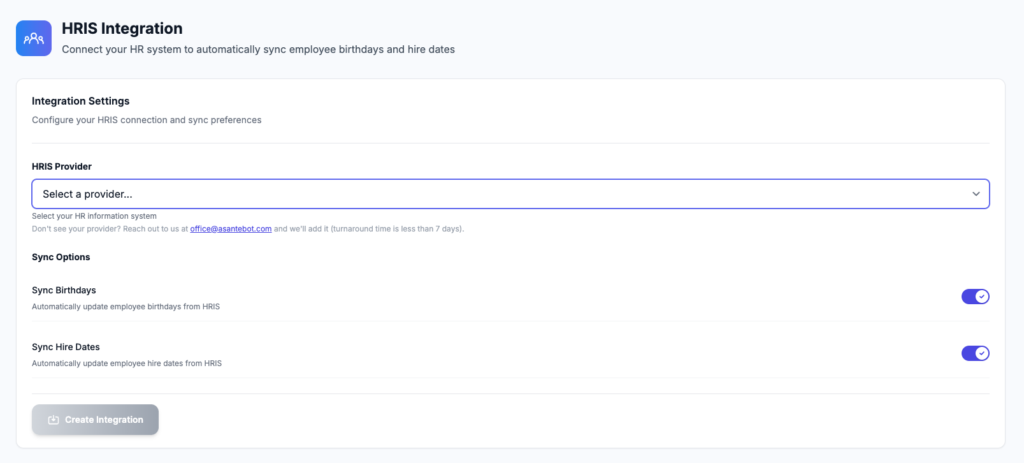
You’ll see the Integration Settings panel with: - HRIS Provider dropdown
- Sync Birthdays toggle
- Sync Hire Dates toggle
- Create Integration button
2) Choose your HRIS provider
- Click Select a provider…
- Choose one of HRIS integrations from the list
3) Choose what to sync
Under Sync Options, enable the toggles you want:
- Sync Birthdays → Automatically update employee birthdays from your HRIS
- Sync Hire Dates → Automatically update employee hire dates from your HRIS
Tip: Most teams enable both so birthdays + anniversaries stay accurate automatically.
4) Create the integration
- Click Create Integration
Asante Bot will create the connection using your selected provider + sync options.
5) Verify it’s working
After creation:
- Check a few employee profiles in Asante Bot (or your People directory view, if you have one)
- Confirm birthdays and/or hire dates match what’s in your HRIS
- If your HRIS has incomplete data (missing birthdays/hire dates), those fields may remain blank until HRIS records are updated
Updating or disabling sync later
Any time you want to change behavior:
- Return to HRIS Integration
- Toggle Birthdays and/or Hire Dates on/off
- Save/update (depending on your UI flow)
Troubleshooting
“My HRIS provider isn’t listed”
If your provider isn’t available in the dropdown, use the support email shown on the page to request it.
“Nothing synced” / “Dates look wrong”
Common causes:
- The HRIS records are missing birthdays/hire dates
- Fields are restricted in HRIS permissions
- Employees exist in Slack but not in the HRIS directory (or emails don’t match)
“Workday API URL didn’t work for me”
Workday endpoints typically require tenant-specific auth and correct API version + scopes. If you’re testing Workday, you usually need credentials and the right auth flow rather than a raw URL in the browser.
FAQ
Does Asante Bot post birthdays/anniversaries automatically?
It can—sync provides the dates; your celebration automations determine how and when posts happen.
What data does the integration sync?
This integration is focused on birthdays and hire dates (as shown in the Sync Options). Other HR fields may not be included.
Is this a one-time import or ongoing sync?
It’s designed to keep data updated automatically after you connect.