
Private Emoji Points

Some Emoji points belong off the channel

Send private Emoji points without a public post. Same recognition — just between you two.
  • No credit card required
  • Access to All Features
  • 2 minute setup
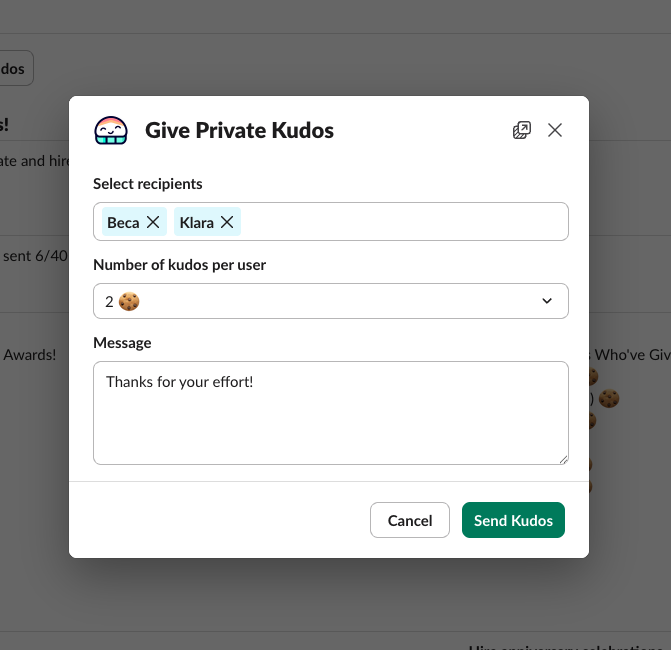
Give Private Kudos
Asante Bot · Home tab
Private
Give Private Kudos modal in Slack — select recipients, set kudos per user, write a message, and send
End-to-end privateNo #channel post
Visible to
Just you two
🏆
Sara’s points
47 → 52
🤫
Sent this week
12 privately
12,000+
Active users
25+
Countries
1M+
Emoji points given
4.8/5
Average rating

Why teams pick Asante

Recognition without the spotlight

Private when it matters. Counted, always.

Authentic, not performative

Say thanks without the pressure of a public post.

Made for sensitive moments

Encouragement, delicate praise, or quiet support.

Still counts in the stats

Private Emoji points roll up to insights and leaderboards.

Add to Slack for Free
Private Emoji points2 people
Visible to
  • You
  • Sara A.
Hidden from
  • #shoutouts
  • #general
  • Everyone else
Sara still earns +5 points
Counted in stats & leaderboards
Private only

How it works

Recognition that stays off the channel

No spotlight required. The visual shows exactly who sees it — and who doesn’t.

  • Send from the Asante Home tab — no channel post required.
  • Add a personal note only the recipient sees.
  • Points still count toward their balance and rewards.
  • Only the giver and receiver see the message.

What changes

Same Emoji points, none of the awkward

Private when needed. Counted, always.

100%
private
Never posted to a channel
+5 pts
still counted
Same value as a public Emoji points
1 click
to send
Right from the Asante Home tab
Add to Slack for Free
  • Free forever plan
  • 2-minute setup

Get started

From install to first private Emoji points in 4 steps

Install, open the Home tab, send, done.

  1. Step 01 · Install

    Add Asante to Slack

    One click. No IT ticket.

    Add to Slack2 min
  2. Step 02 · Open

    Open the Asante Home tab

    Find the Asante app in Slack.

    Asante Bot
    Home tab
    Open
  3. Step 03 · Send

    Click Give Private Kudos

    Pick people, points, and a note.

    Give Private Kudos🏆🏆🏆
  4. Step 04 · Quietly

    Delivered, quietly

    Only the recipient sees it.

    Only Sara saw itSent
Add to Slack for Free
  • Free forever plan
  • Setup in under 2 minutes
“After two weeks of cryptically posting doughnut messages in our announcements channel, we rolled out Asante Bot – a Slack-based recognition and rewards platform. Team members tag a colleague with a kind message and a 🍩 emoji, and others can add 🍩 reactions to give extra recognition points. The result was strong engagement, visible appreciation, and a central spot for connection in our remote work environment, all right in Slack.”
Charles Sustaita
Director of Customer Support, Coastline Academy
Get started in minutes

Make recognition a daily habit

Start free with full access, or book a 15-minute demo and see how Asante Bot fits your team — all without leaving Slack.


  • Free forever
  • 2-minute setup
  • No credit card