

Slack birthday & anniversary reminders
Asante auto-posts every birthday and work anniversary to the Slack channel you choose — at 10:00 AM by default, or exactly the time and timezone you pick on the paid plan.
Slack Birthday Bot · Free forever
Asante is the free Slack birthday bot for automatic birthday reminders, work anniversary shoutouts, and team kudos — all in one Slack app. Two-minute setup, no credit card, on every Slack plan.
Why teams pick our Slack birthday bot
One free Slack app for birthday reminders, work anniversary celebrations, and team kudos.
Asante auto-posts every birthday and work anniversary to the Slack channel you choose — at 10:00 AM by default, or exactly the time and timezone you pick on the paid plan.

Birthdays, work anniversaries, or any custom milestone — write the message, drop a GIF, make it yours. Part of the paid plan, included in the 30-day trial.

The only Slack birthday app that pairs every celebration with Emoji points and gift-card rewards.
Birthdays + Anniversaries
One free Slack app for every milestone your team should celebrate — birthdays, work anniversaries, new-hire welcomes, and custom dates.
Inside the bot
Birthday reminders, anniversary tracking, custom milestones, bulk import, and team kudos — built for Slack.
Automatic birthday reminders for every teammate, posted to your Slack channel the moment the day starts.
1-year, 5-year, 10-year — Asante tracks every hire date and posts the anniversary shoutout on time.
New-hire welcomes, promotions, certifications, project launches — celebrate anything on the date you set.
Upload a CSV for free, or connect your HRIS on the paid plan to sync birthdays and hire dates automatically.
Pick the channel — #birthday-celebrations, #people-ops, anywhere. Reminders post at 10:00 AM, or at the exact time and timezone you set on the paid plan.
Pair every celebration with Emoji points teammates can send. Points turn into gift cards in the Rewards marketplace.
Why teams switch
What changes when the Slack birthday bot remembers every date for you.
Get started
Install Asante, add birthdays and anniversaries, pick a Slack channel, celebrate.
One click. No IT ticket.
Bulk import or add one by one.
And the time it should post.
The team reacts. You sip coffee.
FAQ
Quick answers about installing, using, and pricing Asante's birthday bot for Slack.
Yes. Asante's core birthday bot is free forever, on every plan — automatic birthday and work anniversary shoutouts with built-in message templates, posted at the default time (10:00 AM workspace time). No credit card needed. Premium extras — custom messages & GIFs, choosing your own send time and timezone, and HRIS sync — are part of the paid plan, and you get all of them during the 30-day free trial.
Click 'Add to Slack' above, approve the permissions in the Slack OAuth prompt, and you're in. Most teams are live in under two minutes — no IT ticket, no admin console.
Yes. The same bot tracks birthdays, work anniversaries, and any custom milestone you create. Asante posts each one to the Slack channel you choose — at 10:00 AM by default, or at the exact time you pick on the paid plan.
Yes — that is exactly what Asante does. The bot auto-posts the anniversary shoutout, and the post includes Emoji points teammates can react with. Points convert to gift cards in the Rewards marketplace, so a single message becomes both the celebration and the gift.
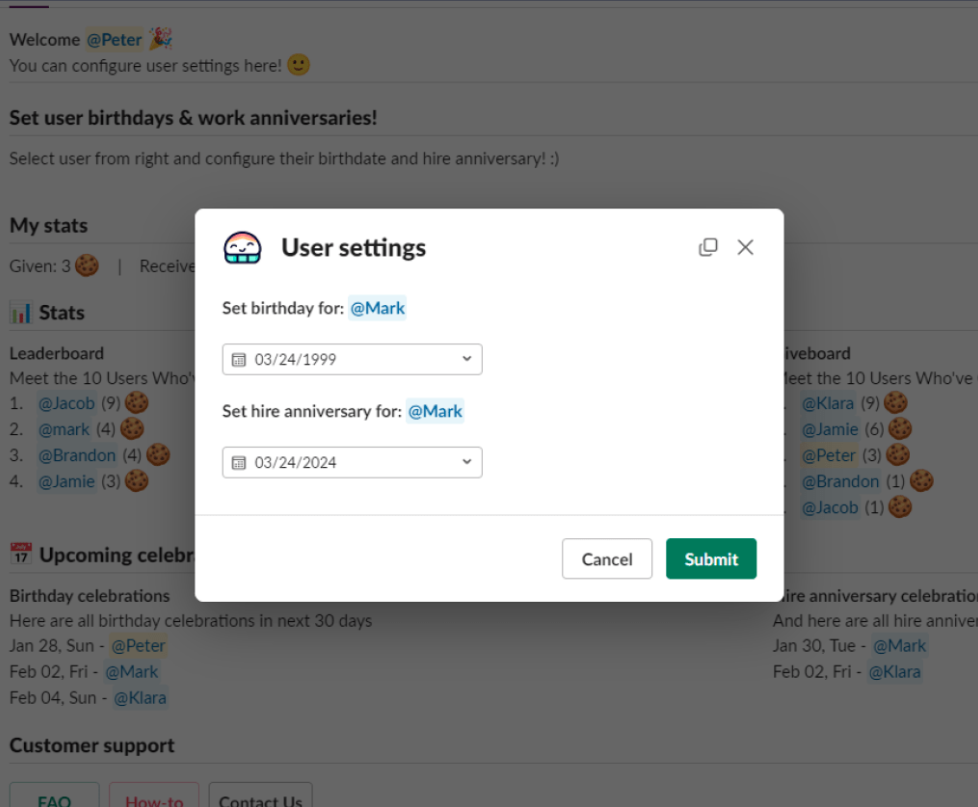
Yes. Upload a CSV for free and Asante imports the full team at once. On the paid plan you can also connect your HRIS (BambooHR, Deel, and more) to keep birthdays and hire dates synced automatically. Individual dates can still be added or edited later from the in-Slack user settings modal.
No. Asante posts one celebration message per person per event, in the channel you specify and on a predictable schedule. You can route different milestones to different channels, group everyone into a single daily post, or skip weekends.
Asante is the only free Slack birthday bot that combines automatic birthday reminders, work anniversary tracking, custom milestones, and team kudos in one app. Most birthday bots stop at the reminder; Asante also gives teammates a built-in way to celebrate back with points and gift cards.
Yes — on the paid plan (and during the 30-day free trial). Write your own messages, add GIFs, and tailor the wording per event type, so birthdays stay playful and anniversaries professional. On the free plan, Asante uses its built-in template library.
Look for a Slack-verified app (Asante is listed in the Slack App Directory), a free forever plan you can evaluate without a credit card, public customer reviews on G2 or Product Hunt, and built-in controls for what's posted, when, and where. Asante meets all four — and adds team kudos on top.
Free forever · No credit card · Slack-verified
“After two weeks of cryptically posting doughnut messages in our announcements channel, we rolled out Asante Bot – a Slack-based recognition and rewards platform. Team members tag a colleague with a kind message and a 🍩 emoji, and others can add 🍩 reactions to give extra recognition points. The result was strong engagement, visible appreciation, and a central spot for connection in our remote work environment, all right in Slack.”
Start free with full access, or book a 15-minute demo and see how Asante Bot fits your team — all without leaving Slack.


