
Getting started
Using Birthday & Work Anniversaries bot in Asante Bot
Asante Bot includes the Anniversaries and Birthday Bot for Slack (Celebration bot) on every plan. This Celebration bot sends messages to your desired channel,…
Asante Bot includes the Anniversaries and Birthday Bot for Slack (Celebration bot) on every plan — core birthday and work anniversary shoutouts are free forever. This Celebration bot sends messages to your desired channel, allowing users to give Kudos to individuals celebrating their milestones and birthdays. See What are Celebrations in Asante Bot? for what the feature covers.
On the free plan, celebrations use Asante's built-in message templates and go out at the default time (10:00 AM in your workspace timezone). Custom celebration messages & GIFs, choosing your own send time and timezone, and HRIS sync are part of the paid plan — and all of them are included in the 30-day free trial.
How do you set up a Birthday & Work Anniversary bot?
Once you have added Asante Bot to your Workspace, you can go to the App Screen inside Slack.
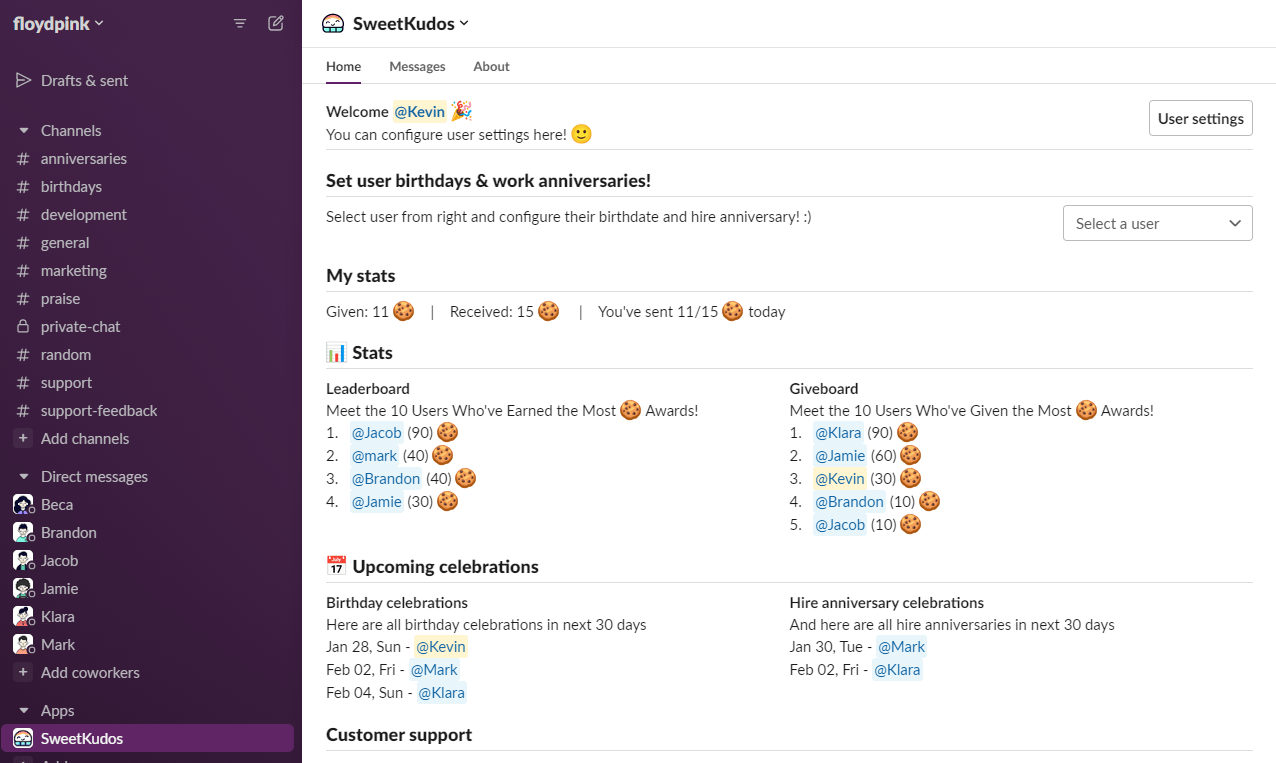
Click on Select a user inside the Set user birthdays & work anniversaries section.
Pick a desired user, and you will get the popup to add the hire anniversary and birthday.