
Feedback Day
How to setup Frequency, Kickoff time and message for Feedback Day?
Inside Settings> Feedback Day, you can set Frequency & Day and Kickoff time for Feedback Day. Feedback Day Frequency & Day configuration: Kickoff time configuration:
Inside Settings> Feedback Day, you can set Frequency & Day and Kickoff time for Feedback Day.
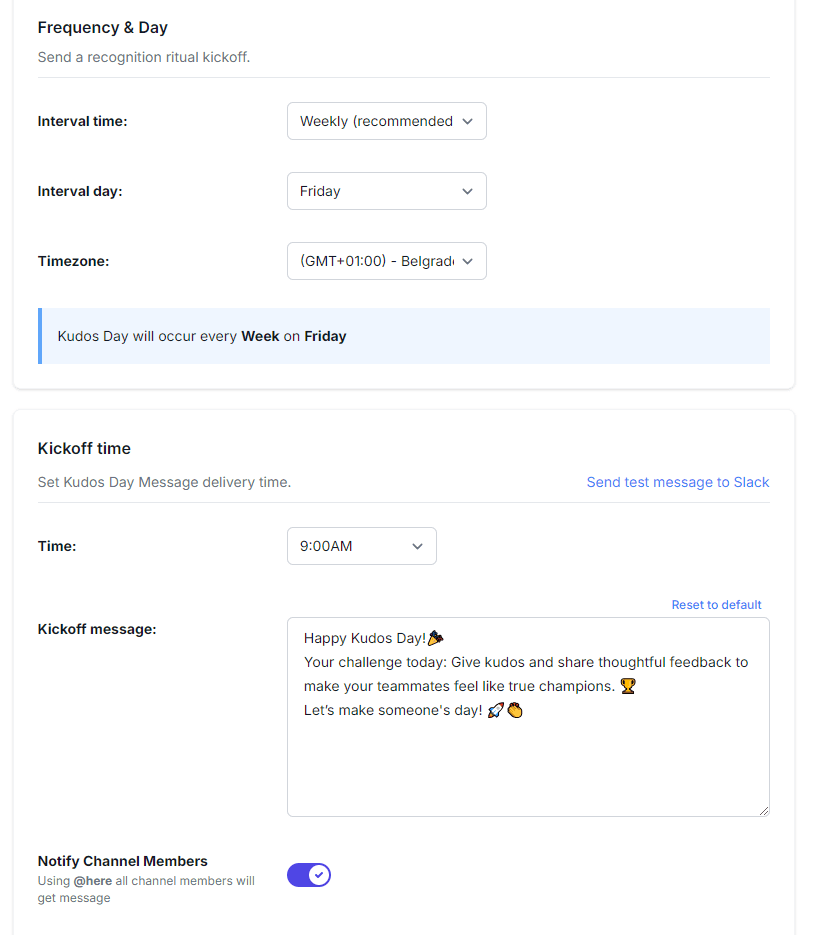
Feedback Day Frequency & Day configuration:
- Interval time: Choose how often Feedback Day occurs—Weekly, Bi-Weekly, Tri-Weekly or Monthly (with Weekly being the recommended default).
- Interval Day: For Feedback Day, select the specific day. Default is Friday.
- Time Zone: Set the appropriate time zone for your location
Kickoff time configuration:
- Time: Choose the specific time the Feedback Day message will be sent (e.g., 9:00 AM).
- Kickoff Message: Use the Send test message to Slack button to preview the Feedback Day announcement. Emojis are included in the default message, showing that the editor supports them.
- Notify channel Members: The bot uses @here inside the desired channel, so all the users will be notified that Feedback Day has started.